
📅 Payment Plan Calculator for Debts with Simple Monthly Interest.
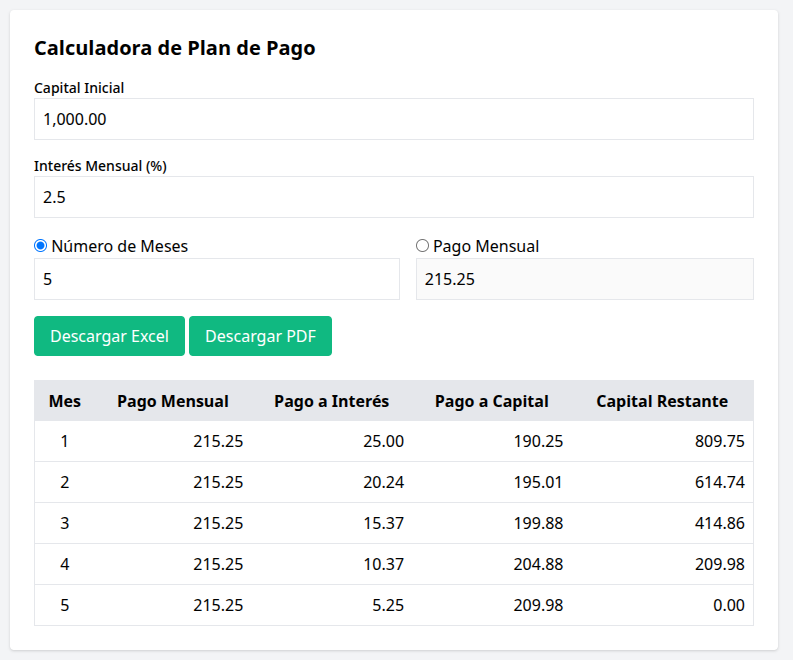
Sometimes, the simplest ideas can turn into interesting projects. My wife asked for my help in calculating the monthly payments for a debt with interest, and that led me to create a web tool that makes the process easier.
Initially, we started with a basic Excel sheet to track payments and monthly interest. However, the manual updating process became tedious, so I decided to take it to the next level: an interactive and dynamic web calculator.
💻 Technologies Used
- HTML and Tailwind CSS: For structure and visual design.
- JavaScript (without frameworks): All the behavior is handled using pure JavaScript.
- Nginx + Docker: To serve the application efficiently and maintain a clean structure.
- html2pdf.js: To export the results to PDF.
- Excel Export: Manual implementation of the CSV exporter while maintaining the correct numeric formats.
🛠️ Key Features
- Data Input:
- Initial Capital
- Monthly Interest Rate (%)
- Monthly Payment or Number of Months (one must be selected).
- Automatic Calculation:
- As values are entered, the payment plan is generated automatically, eliminating the need for a "Generate" button.
- Installment Limit:
- A maximum of 100 installments is displayed.
- If the monthly payment is insufficient to reduce the capital, the system displays
∞.
- Dynamic Numeric Formatting:
- The inputs for capital and monthly payment maintain currency formatting at all times (
1,234.56).
- The inputs for capital and monthly payment maintain currency formatting at all times (
- PDF and Excel Export:
- The generated table can be downloaded in both formats, preserving the correct numeric format.
📝 Interesting Code Snippets
1. Dynamic Numeric Formatting:
function formatToCurrency(input) {
  let value = input.value.replace(/[^0-9]/g, "");
  if (!value) {
    input.value = "0.00";
    return;
  }
  value = (parseInt(value, 10) / 100).toFixed(2);
  input.value = new Intl.NumberFormat("en-US", { minimumFractionDigits: 2, maximumFractionDigits: 2 }).format(value);
}
2. Automatic Payment Plan Calculation:
function generatePlan() {
  const capital = parseFloat(document.getElementById("capital").value.replace(/,/g, ""));
  const interestRate = parseFloat(document.getElementById("interest").value) / 100;
  const payment = parseFloat(document.getElementById("payment").value.replace(/,/g, ""));
  let balance = capital;
  let month = 1;
  let planData = [];

  while (balance > 0 && month <= 100) {
    const interest = balance * interestRate;
    const paymentToCapital = Math.min(payment - interest, balance);
    balance -= paymentToCapital;

    planData.push({
      month,
      payment: payment.toFixed(2),
      interest: interest.toFixed(2),
      capital: paymentToCapital.toFixed(2),
      balance: balance.toFixed(2),
    });

    month++;
  }

  renderPlanTable(planData);
}
3. PDF Export:
function downloadPDF() {
  const planContainer = document.getElementById("plan-container");
  if (!planContainer.innerHTML.trim()) return;

  const options = {
    margin: 10,
    filename: 'payment_plan.pdf',
    html2canvas: { scale: 2 },
    jsPDF: { unit: 'mm', format: 'a4', orientation: 'portrait' }
  };

  html2pdf().set(options).from(planContainer).save();
}
✅ Final Outcome
Now, my wife has a simple tool to calculate her monthly payments, and I have an interesting project that could potentially expand with more features. A good exercise in pure JavaScript, event handling, and frontend optimization.
If you want to try it, you can find it here: payplan.yanez.life